
Whiteout Survival
Public WOS code sources plus Century’s WOS redeem API.
One of the most popular features. Autopilot keeps a game-scoped registry of Century Game promo codes in db/state/state.db, scrapes new ones from configured sources, and redeems them against every configured account. The dashboard page is your single view of “which codes succeeded for which accounts.”
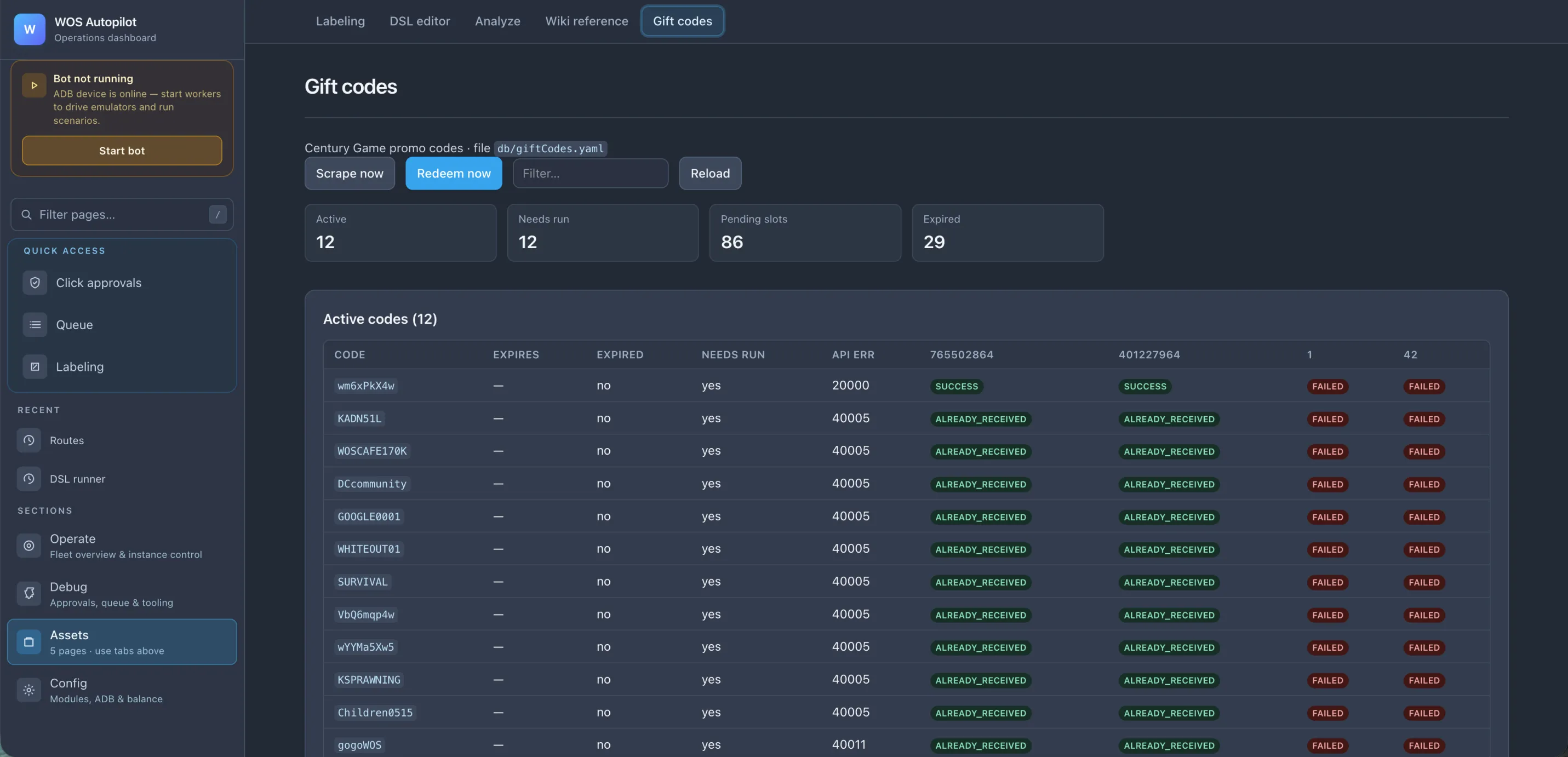
Scrape now button all hit the configured source for the selected game, dedupe against state.db, and store anything new.Redeem now (or the shared 6-hour poll cycle) walks every account configured in db/state/state.db and submits each pending live-game code. The matrix view shows the result per account, per code.uv run play can refresh and redeem live codes even before you press Start bot.ALREADY_RECEIVED for an account, it never gets retried for that account. SUCCESS rows turn green and are dropped from the next pass.SUCCESS — code redeemed, rewards in inboxALREADY_RECEIVED — this account already had it (no retry)FAILED — API rejected the attempt or a transient request failed; it will be retried on a later runCDK_EXPIRED / CDK_NOT_FOUND — the code is globally dead and skipped on later runsSTOVE_LEVEL_TOO_LOW / VIP_LEVEL_TOO_LOW — this account is not eligible for the codePENDING — queued but not yet attemptedAPI ERR column shows the upstream code (20000, 40005, …) so you can tell “the code is bad” from “this one account is rate-limited.”The Gift codes page has separate tabs for:
Whiteout Survival
Public WOS code sources plus Century’s WOS redeem API.
Kingshot
Kingshot code aggregator plus Century’s Kingshot redeem API.
WOS Beta
Code discovery from a Discord channel, stored under wos_beta. Apply manually inside the beta game client for the logged-in player.
Kingshot Beta
Code discovery from a Discord channel, stored under kingshot_beta. Apply manually inside the beta game client for the logged-in player.
Beta tabs are discovery/manual-apply only. They still show discovered codes in the same table, but Redeem now and the external-account panel are hidden there because beta code application belongs to the in-game interface and only affects the current beta player.
PENDING state.account × code pairs waiting to be tried (this is what the next run will burn through).Manual gift code redemption is the single biggest time sink for a Whiteout Survival multi-account player — every time the Century Game team or a content creator drops a new code, you’d otherwise have to switch accounts and re-type it N times. The bot does the whole sweep in one pass and logs which accounts came up empty so you can spot a stuck account quickly.
Beyond the accounts the bot owns, the redeem loop can target any list of player IDs (FIDs) you paste in — alliance members, partner farms, secondary accounts on other servers, friends who don’t run the bot themselves. Same matrix view, same per-code/per-account status, same retries.
Bulk-paste accepts fid or fid label, one per line. Scope is per game — WOS and Kingshot have independent lists.
The External accounts panel on the Gift codes page is where you manage this list. Each external ID gets its own column in the matrix alongside your own accounts. Add or remove rows in the panel at any time — every listed ID is included on the next redeem pass.
Gift codes run through a global HTTP poller, not through emulator scenarios:
uv run play / uv run api) starts one background gift-code cycle.Scrape now is a direct dashboard action for the selected game; Redeem now is shown only for live games.For beta games, the same cycle only scrapes Discord and stores new codes. It does not acquire the redeem lock or run a no-op redeemer.
The shared cadence keys look like wos:scheduler:gift_codes_poll:{game}. The redeem locks look like wos:gift_code_redeem:lock[:game].
Open Gift codes, switch to either beta tab, and paste your Discord token into Discord beta source — that’s the only field. The beta channels are built in, no IDs to configure.
How to find your Discord token: see this Reddit thread.
Autopilot stores this configuration in the encrypted db/state/state.db runtime database. The token is never echoed back to the browser after save; the page only shows whether a token is configured.
The parser looks for common labels such as gift code:, promo code:, code:, and backticked tokens.