
Device management
The ADB page in the operator dashboard reconciles your configured fleet (stored in db/state/wos.db) with whatever adb devices is currently reporting on the host. It picks the fastest viable capture/input backend per device automatically and gives you one-click controls to fix the rare cases when it can’t.
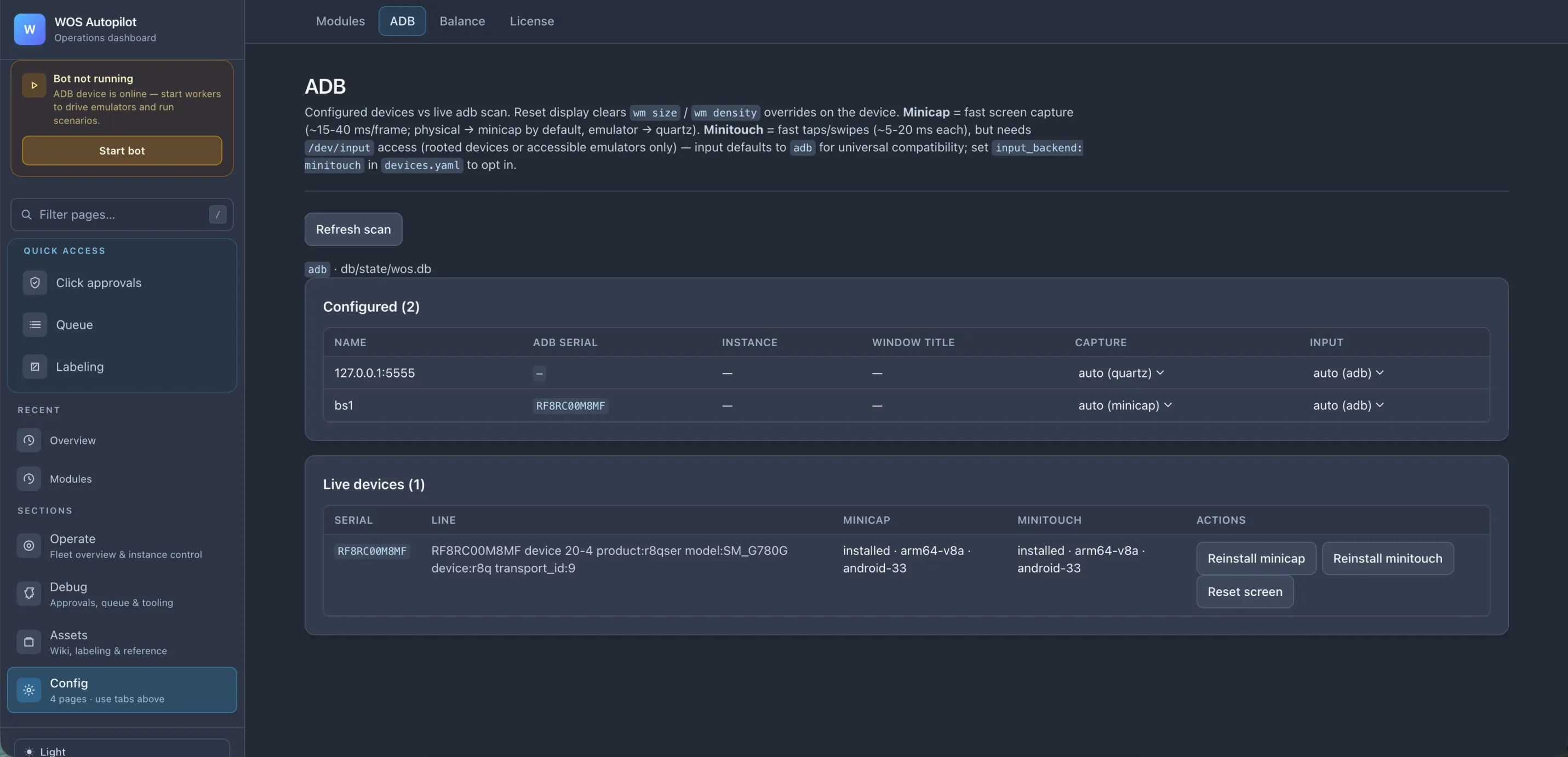
What you get
Section titled “What you get”- Configured vs live — two side-by-side tables: what you’ve declared in the SQLite devices table (configured) and what
adb devicesis reporting right now (live). Mismatches are obvious at a glance. - Manual device add. If the scan misses a BlueStacks instance or another emulator, use Add device and enter the instance name plus ADB serial directly. Existing rows can be replaced or removed from the same page.
- TCP port scan with a smaller default step. The scan probes the BlueStacks-style port range in steps of
5by default, which catches more local instances than the older coarse scan. - Auto-picked capture backend per device. Every device defaults to scrcpy (live H.264 stream); it falls back to a direct adb
screencapif the stream is unavailable. Override per device by settingcapture_backend: scrcpy | adb | autoin the devices table. - Auto-picked input backend per device. adb input is the universal-compatibility default (~50–80 ms/tap). mintouch is the fast path (~5–20 ms/tap) but needs
/dev/uinputaccess (rooted devices or accessible emulators). Opt in withinput_backend: mintouchin the devices table. - Live binary status. For each connected device, the page shows whether scrcpy-server and mintouch are installed, with the actual architecture (e.g.
arm64-v8a · android-33). - One-click recovery. Per-device action buttons:
- Reinstall scrcpy — push
scrcpy-server.jaronto the device. - Reinstall mintouch — same for the input binary.
- Reset screen — clear any
wm size/wm densityoverrides the bot might have applied during a failed run (a common cause of “everything’s drifted by 8 pixels” mysteries).
- Reinstall scrcpy — push
- Refresh scan — re-runs
adb devicesand the binary probes without restarting anything.
When scan is not enough
Section titled “When scan is not enough”Some emulators expose ADB on a valid TCP port but do not appear in the scanned range, or keep an old offline serial around after reconnecting. In that case, add the instance explicitly:
- Open Devices (ADB).
- Click Add device.
- Enter a stable instance name such as
bs1and the serial shown byadb devices, for example127.0.0.1:5615. - Keep the default backends unless you are intentionally testing
scrcpyormintouch.
The worker resumes automatically once the configured serial is online.
Account identity by avatar
Section titled “Account identity by avatar”The bot can identify the active account from the chief avatar shown in the top-left of the main city. This is a fast fallback before the full chief-profile OCR probe: if active_player is empty, the rolling frame matcher treats the visible avatar as the account identity and compares that crop with the saved reference for each configured player on that device.
Recommended setup: give every account on the same emulator/device a different in-game avatar before relying on avatar identity. The matcher does not try to infer the player from profile text in this fast path; the avatar is the signal.
If two accounts share the same avatar, the matcher intentionally treats the result as ambiguous and the normal chief-profile identity flow takes over.
To refresh a player’s avatar reference:
- Open the game on that account and leave it on the main city screen.
- Start the worker so the dashboard has a fresh live frame.
- Open Player state, choose the instance and player, then click Update avatar reference.
Avatar references are stored locally under db/state/player_avatars/ with the rest of the runtime state. They are not part of the release image.
Backend trade-offs
Section titled “Backend trade-offs”| Backend | Latency | Requires |
|---|---|---|
adb input | ~50–80 ms/tap | nothing — works everywhere |
mintouch input | ~5–20 ms/tap | /dev/uinput (rooted device or --allow-root emulator) |
adb capture | ~250 ms/frame | nothing — works everywhere |
scrcpy capture | live H.264 stream | scrcpy-server jar installed on device (page handles install) |
The defaults are chosen for safety (works-everywhere). Opt into the fast path when your emulator/device supports it and you need the extra throughput — e.g. when running many instances on one host.